After a trade
After a Binance Spot sell, how much do you actually receive?
You type the amount in the left-hand asset; the right-hand asset is what comes back. Which side carries the fee is a question for the trade record.
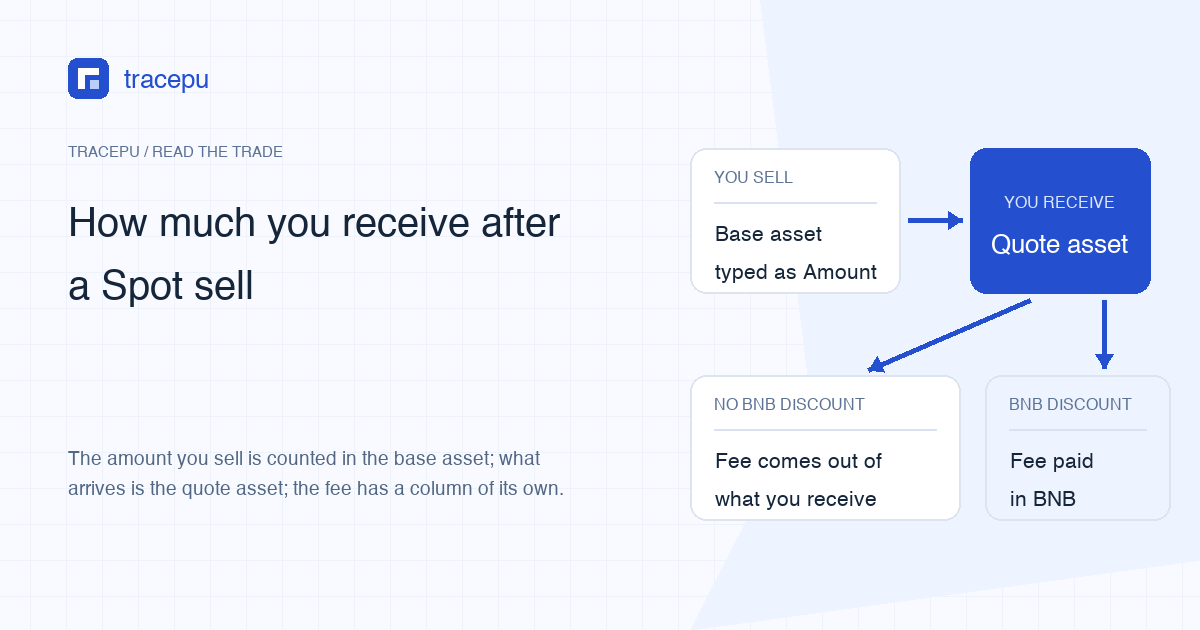
Sell in BTC/USDT and you hand over the ticker on the left of the slash, BTC, while what lands back in the Spot wallet is the one on the right, USDT. What arrives is roughly the value of the fill minus the trading fee. With no BNB discount in play, Binance takes that fee straight out of the USDT you just received, so the balance moves by slightly less than price × quantity.
If the BNB discount is turned on in your account and available for the pair, and your Spot wallet holds enough BNB to cover the fee, the full fill value arrives in USDT and the fee comes out of BNB instead. Don't look for the deduction in the USDT column; it is recorded on the BNB line.
Which side of the pair you are typing in
On the sell form, Amount is denominated in the base asset, the left-hand ticker. Total is denominated in the quote asset. The order book sitting next to the form labels its columns the same way, and it is quicker to check there than in the form.
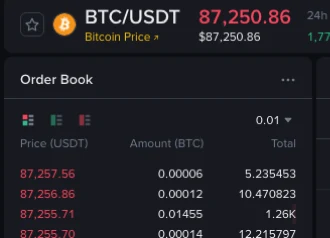
Which asset you finish holding is therefore settled before you press Sell. Sell BTC in BTC/USDT and USDT comes back; sell the same BTC in BTC/USDC and USDC comes back. Binance will not convert one stablecoin into the other for you. Choose the right-hand ticker in the pair list first, then type the amount. If left and right still feel interchangeable, how to read a trading pair starts there.
Working out the amount that arrives
The Binance help page How to Calculate Binance Spot Trading Fees? puts the rule in one sentence: trading fees are always charged in the asset you receive, so selling ETH/USDC means the fee is paid in USDC. Its own sell example runs like this.
From the help page: Trading Fee = (10 ETH × 3,452.55 USDC) × 0.1% = 34.5255 USDC. The price and the 0.1% belong to that illustration, not to your account. Your rate is whatever your own fee page shows.
Turned around and read from the receiving side, that becomes three steps.
- Multiply filled quantity by fill price for the fill value, denominated in the quote asset. An order that filled in several pieces is added up piece by piece.
- Open the trade record and read the fee together with the asset name printed beside it. If that name is the quote asset, subtract the fee from the fill value.
- If the fee asset says BNB, subtract nothing on the quote side. That fee is reconciled against the BNB balance instead.
Worked example: you sell 2 ABC at 50 USDT, so the fill value is 100 USDT. The record shows a fee of 0.1 USDT, which means this sell raises USDT by 99.9. Had the fee been shown as some quantity of BNB, USDT would have gone up by the full 100 and BNB would have fallen separately. ABC and these numbers are invented; they exist only to show which side the subtraction belongs on.
The one thing not to do is subtract 0.1 USDT from 2 ABC. Those are not the same unit. On Binance's description, a sell fee is never shaved off the asset you sold — it lands on the asset you received, or on BNB.
What the record looks like with the BNB discount on
The Spot API documentation is the clearest place for the conditions. The discount has to be enabled at the account level and for the symbol, and the BNB balance has to cover the discounted fee; when BNB falls short, the full fee is charged in the quote asset you received. The help centre adds one more condition that is easy to miss: the BNB has to be in the Spot wallet. BNB parked in another wallet does not count.
On a sell with the discount applied, the fee is worked out in the quote asset first and then converted to BNB. For a pair without BNB in it, such as BTC/USDT, Binance's BNB fee page says the conversion uses an average rate rather than the spot rate at the time. Recalculating with the BNB price at the moment of the fill can therefore land slightly off the record; go by the BNB shown as deducted in Trade History. The estimated fee printed on the order form before you submit is a separate figure: Binance says the estimate on the trading page is for reference only, and the actual fee depends on the assets you end up receiving.
There is a third case that looks like a broken switch — the toggle is clearly on, yet this one sell still charged USDT. Check the BNB balance in the Spot wallet, then check whether the discount applied to that pair at that time. Only if both look right is it worth taking the order ID to support.
You sold 100%, so why is a sliver still there?
After moving the sell slider to 100%, you may still see a small balance of the same coin. It could be a remainder that did not fit the order rules, an unfilled part of the sell order, or an amount credited after the sale.
Check Order History first: did the sell fill completely or only partly? Then look for later trades, transfers or deposits involving that asset. Once you have confirmed a full fill and no later balance changes, check the step size and minimum order value below.
Every pair sets a step size: an order quantity has to be a whole multiple of a minimum increment. A balance sitting slightly above one of those multiples leaves an excess that cannot be written into the order, so it stays where it is. There is a minimum order value too, which means a leftover can line up with the step size and still be rejected for being worth too little. Both rules have pages of their own — step size and minimum order — and the current numbers for a specific pair come out of the Spot order rules lookup.
Leftovers have a second source worth knowing about. When you bought, the fee came out of the crypto you were buying, which left the balance as a number with a long decimal tail. Selling rounds down to the step size, and the tail stays behind.
Where to reconcile this one trade
Not on the portfolio overview. Those totals mix in every other order, transfer, deposit and withdrawal from the same window, and a single trade's contribution disappears into them. Three narrower records answer the question.
- Order History: whether this sell reads Filled or Partially Filled, and how much of it executed.
- Trade History: fill price, filled quantity, fill value, fee and fee asset, line by line.
- Spot balances: the quote asset should rise by the fill value minus any fee charged in that same asset, and the base asset falls by the quantity that executed.
A partially filled sell needs one extra look. While the order remains open, its unsold base asset stays locked rather than available. Any unfilled amount returns to the available balance when you cancel the order, it expires under its order rules, or the exchange cancels it. Partially filled orders and available and locked balance both walk through that reading.
If the three records still leave a gap, copy down the order ID, the fill time, the pair, the side and the fee asset before you contact support. What to hide in an order screenshot lists what to cover before sending anything.
Sources: Binance Support, How to Calculate Binance Spot Trading Fees? and How to use BNB to pay for fees and get a discount, plus the developer Spot commission FAQ, all consulted on 23 September 2026. Rates and discount conditions change; what applies is whatever your own account page shows when you place the order.