Order status
Why a Binance market order with slippage tolerance only partly fills
With the setting on, a market order runs as a limit IOC order: whatever fits inside the slippage price fills, and the rest is cancelled instead of waiting under Open Orders.
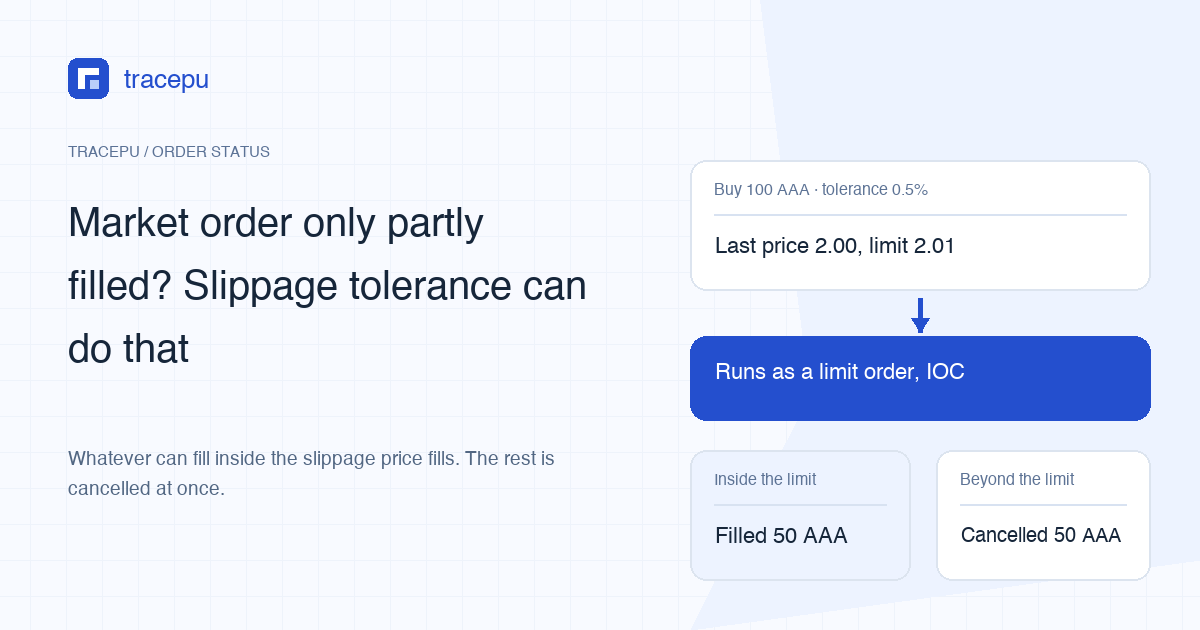
Suppose you ask for 100 coins at market and get 50. Order history lists the order as Market with Slippage, which means Slippage Tolerance was switched on when you placed it. Binance's help article, checked in November 2026, What Is Slippage Tolerance on Binance Spot? spells out the consequence: “If the order amount exceeds the available depth within the slippage tolerance, the remaining unfilled portion will be canceled.”
So this order is finished. The missing 50 are not queuing anywhere, and you won't find them under Open Orders. The 50 you did get are yours and stay filled.
A market order with slippage tolerance is really a limit IOC order
A plain market buy works through the sell orders on the book one level after another, and each level can be worse than the last. It can still stop short if depth runs out or a trading rule gets in the way. Slippage Tolerance adds a ceiling (a floor when you sell): Binance works out a price limit, then, in the help article's words, the order is “executed as limit orders with Time in Force set to IOC (Immediate or Cancel).”
IOC means whatever can fill right now fills, and nothing is left on the book. Two things follow from that:
- Unlike an ordinary limit order, it will not sit and wait for the price to come back. The cancellation happens the moment the order is processed.
- The word “limit” in your records doesn't mean you picked the wrong button. The help article says a filled order “will appear as a limit order in your order history instead of a market order,” while the steps for the website and the app both name Market with Slippage as the record to look for, and the website shows the percentage next to it under Type.
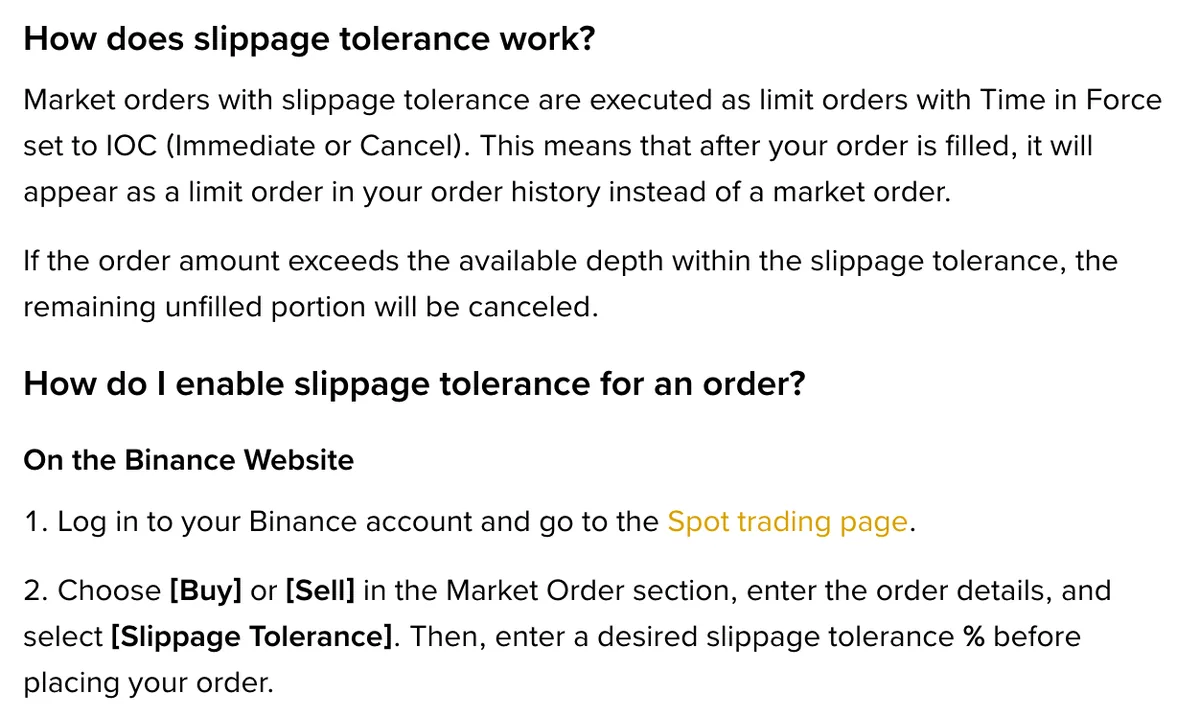
Where to turn on slippage tolerance on Binance
The setting only appears in the Market section of the order form, and it works much the same on both versions:
- Website: on the Spot trading page, go to the Market section, choose [Buy] or [Sell], enter the order, select [Slippage Tolerance] and type a percentage.
- App: go to [Trade] - [Spot], choose [Buy] or [Sell] under Market Order, enter the details, then select [Slippage Tolerance].
- On either one, review the details and press [Confirm], then check [Order History] for the outcome. The website instructions also list [Open Orders] as a place to check, but once IOC matching finishes, any unfilled quantity is cancelled rather than left resting on the book.
A newly listed pair may refuse the setting. Binance's explanation is that when a market opens, the last price may not be available yet, so there's nothing to calculate a limit from and the order can't be placed.
How Binance calculates the slippage price, and why nothing may fill
The formula takes the last price at the moment you submit:
Buy: slippage price = last market price × (1 + slippage)
Sell: slippage price = last market price × (1 − slippage)
Say AAA/USDT last traded at 2.00 USDT. A 0.5% tolerance on a buy gives a ceiling of 2.00 × 1.005 = 2.01 USDT. At the same price, a 1% tolerance on a sell gives a floor of 2.00 × 0.99 = 1.98 USDT. The result also has to fit the pair's tick size: if the sum comes to 1.237702 on a pair priced to three decimals, it has to land on a valid price. Binance doesn't say which way it rounds, so don't count on a fill that depends on the very last tick.
Notice what the formula starts from: the last price, not the best ask. In a fast market those two can drift apart. Suppose the last price is still 2.00 but the lowest sell order is now 2.03. Your 2.01 ceiling reaches no sell order at all, and by the IOC rule the whole order cancels with zero filled.
Same order book, with and without the setting
Keep the same pair and buy 100 AAA. Assume the book shows 30 AAA at 2.00, 20 AAA at 2.01 and 500 AAA at 2.02, and no other order rule interferes.
0.5% tolerance (ceiling 2.01): 30 × 2.00 + 20 × 2.01 = 100.20 USDT for 50 AAA. Average price 100.20 ÷ 50 = 2.004. The other 50 AAA cancel.
No tolerance: add 50 × 2.02 = 101 USDT, for 201.20 USDT in total and 100 AAA. Average price 2.012.
The average price is 2.012 − 2.004 = 0.008 USDT lower with the setting, but you bought only 50 AAA instead of 100; the first 50 cost the same either way. A tight tolerance trades access to higher-priced sell orders for a smaller fill. Widening or removing it lets the order reach more prices, without guaranteeing that the full quantity will fill. Either way, check how many levels your size would eat through before you copy a percentage from someone else.
Fees apply only to what actually filled; the cancelled part never traded. Because this order only takes liquidity that is already resting on the book, it should count as the taker side by Binance's definitions. The trade details show the exact fee and the asset it came out of, and why a limit order can pay taker fees explains the difference.
Why the filled amount differs from what you entered
The help article's FAQ covers this directly: when you place an order by amount with slippage tolerance, “the executed amount depends on the slippage price,” so it can differ from the amount you typed.
Treat your input as the request and the filled quantity and total as the result. If there were several fills, work out the average with the weighted average for multiple fills. The 2.01 ceiling is a limit, not the price you paid.
What to do after a partial fill
- Read the outcome. Start with the filled quantity. Binance's order status definitions put a LIMIT IOC order that partially fills under
EXPIRED, whileEXPIRED_IN_MATCHmeans the exchange expired it because of self-trade prevention. “Market with Slippage” under Type only tells you the setting was on; it doesn't prove why the rest went unfilled. If the record points to a self-trade, continue with why an order can expire without a cancel. - Match the fills. In trade history, check the number of fills, each price and each fee. If a fee came out of the coin you bought, your balance rises by the filled quantity minus that fee.
- Check your balance. Funds set aside for the unfilled part should be back in your available balance. If the numbers disagree, see available vs locked balance.
- Recalculate before you top up. Order only the difference, here 100 − 50 = 50 AAA, and look at the book again instead of resending the original. A small remainder may fall below the minimum order, so adjust the size or look up the limit in the Spot order rules tool.
Once an IOC order ends there's nothing left to cancel. If you are holding an ordinary limit order that's still working, what a partially filled order means covers that case.