Before you start
How to open a Binance account and prepare for a first spot trade
Start with eligibility, secure the account, then learn what to check before and after a small spot order.
Opening an exchange account is often described as a short form followed by a big “Trade” button. That skips the decisions that matter. Before you create a Binance account, confirm four things: the service is available where you live, you can meet the identity requirements shown to you, you can secure and recover the account, and you understand how to tell an order request from an actual trade.
This guide connects those steps without assuming that every reader sees the same products or screens. Binance changes pages by region and account status, and individual products can have separate eligibility rules. Read the current page shown to you as the controlling source. Nothing here is a recommendation to buy a particular asset.
Check current eligibility before entering your details
Start on the official Binance site available in your location. Check whether personal account registration is offered, whether Spot is available, and what identity or residency evidence the page requests. An app being downloadable, a website loading, or an existing account in the household does not prove that you are eligible for every product.
Binance's personal account registration guide shows the signup screens in sequence. Keep it open alongside the form if you need help identifying the next step.
Some places are ruled out entirely. Binance's list of prohibited countries, in the version dated 5 January 2026, says people in the United States (including US citizens), Canada and the Netherlands may not register for or use binance.com, and it also names Cuba, North Korea, Iran and Crimea, among others. Some locations also have separate restrictions on referral participation; those restrictions are set out in the table in the referral section. For anyone living in a prohibited place, no referral code or workaround changes that answer.
Stop here if the page says you are not eligible. Do not change an address, choose a different country, or use somebody else's identity to get around a restriction. If the answer is unclear, use Binance's official support route before registering or depositing.
Eligibility is also specific to the person and product. You may be able to create an account but still need identity verification before trading. A payment method, fiat service, token, or advanced product can have its own conditions. Treat “account created,” “identity verified,” “Spot available,” and “funds usable” as four different statements.
Repeat the availability check if your residence changes or if you return after a long break. An old screenshot, saved bookmark, or earlier approval does not establish current access. Use accurate current details and follow any re-verification request through the official account page. If a service is absent from your interface, do not use a third party's screen as proof that it should be available to you.
Prepare contact and identity details you can keep
Use an email address or phone number you control for the long term. It should not be a temporary inbox, an employer-owned address you may lose, or a number shared with someone who can reset it. Recovery messages and security alerts are only useful when the recovery channel remains yours.
Have the identity documents requested by the current page ready, and enter your own legal information consistently. Do not guess how a name or address should be formatted. If a document and the form appear incompatible, stop and use official support rather than repeatedly uploading altered versions. Verification is an account eligibility step, not a trading strategy.
You should also decide where you will store recovery information before creating credentials. A handwritten recovery record kept securely can be better than an unprotected note on the same phone used for login. A password manager can create and store a long, unique password without asking you to memorize a pattern. NIST's password guidance recommends long passwords, password managers, and multi-factor authentication.
Identity verification deserves the same care as credentials. Use a private connection and a device you control. Check what document is requested, which sides or pages are needed, and whether the submission screen belongs to the official flow. Do not email identity images to an address supplied by a stranger or upload them through a link from an unsolicited message.
Follow the registration sequence without rushing
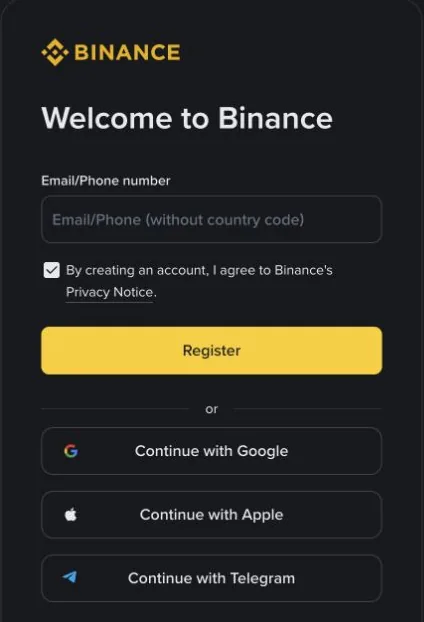
The labels may move, but the basic personal-account sequence is simple:
- Choose personal account registration on the official page for your location.
- Enter your own email address or phone number.
- Read the terms and privacy notice presented to you before accepting them.
- Enter the verification code sent through the channel you chose.
- Create a new, unique password and store it safely.
- If you plan to use a referral code, read the referral field back before submitting. Signup is the simplest time to apply one; adding it afterwards is possible only under the conditions described in the referral section.
- Complete the identity-verification steps required for your account and intended product.
Check the current page for the code's expiry time, password requirements, and verification status. Before supplying credentials, verify that the address belongs to Binance; an older screenshot may show different fields or instructions.
Keep a record of which contact channel you used, but never store the password, one-time code, and recovery data together in an easily copied message. Registration emails can help you confirm the account identifier later. They are not a substitute for checking the official site when you return.
Secure access before you add funds
A unique password protects against password reuse, but it is only one layer. Enable the strongest multi-factor option available to you and preserve its recovery method. The NIST glossary defines multi-factor authentication as using more than one distinct factor, such as something you know and something you possess. Two prompts that both rely on the same compromised inbox do not provide the same separation.
Review the account's anti-phishing, device, withdrawal, and security settings before making a deposit. The practical test is whether you can identify a new-device alert, remove a device you do not recognize, and recover access without handing a one-time code to another person.
Three settings are worth knowing by name. An anti-phishing code is a phrase you choose; Binance includes it in genuine emails and, in some countries, in its text messages, so a message without it deserves suspicion. The withdrawal whitelist sits under Settings → Withdrawal: turning it on and adding an address both require a passkey or 2FA, and changing the whitelist, for example adding an address, may suspend withdrawals for a set period of 24, 48 or 72 hours. Finally, expect a pause after changing your email or authenticator: withdrawals, internal transfers to other Binance users and P2P are disabled for up to 48 hours (Binance Help Center, September 2026; whatever your account's security page shows at the time is what applies). These delays are easier to live with while the account is still empty.
Phishing often manufactures urgency: a message says your account will be closed, a withdrawal is pending, or verification must be repeated immediately. The FTC advises people who suspect a message to contact the company through a website or number they already know is real, rather than the link in the message. Its phishing guide is useful beyond exchanges.
Run a recovery check while the account is empty. Sign out, return through a saved official address, and confirm you know where the recovery process begins. In that empty-account state, you can catch a wrong email, inaccessible authenticator, or missing backup without funds adding pressure.
Never share a password, seed phrase, one-time code, remote-control session, or screen-sharing access with someone claiming to fix the account. Support may help explain a process, but another person should not control your authentication.
Understand the optional referral before using it
If the current registration page shows an eligible offer, you may use code BN7771 through the Binance registration page. What a referred user can receive is a cashback share of eligible trading fees, set on this referral link. The 20% often quoted is the Spot and Margin commission rate a referrer earns on the default tier, not the share you get; check the figure shown at signup and on your account's referral page, subject to your eligibility and Binance's conditions. Tracepu may earn a commission if you register through this link and meet Binance's conditions.
The Binance Referral Pro FAQ (checked in October 2026) explains how the benefit is paid. Your fee rate does not drop when an order fills: the trade is charged at the normal rate. Afterwards, Binance calculates the cashback and converts it to USDC hourly, then credits it to your Spot account. How much of it reaches you depends on the share the referrer picked when creating the link. According to the FAQ, the referrer stops earning Spot and Margin commissions from a referred user once that user reaches VIP 3 or above. Check your own cashback eligibility on your account's referral page. That FAQ does not give a combined calculation for cashback and the BNB fee deduction; check your fee and cashback records separately.
Where you live decides whether any of this applies. The table below draws on Binance's Referral Program Additional Notes (updated 29 June 2026) and its list of prohibited countries (updated 5 January 2026). We checked both in September 2026; if Binance revises either page, its current wording takes priority.
| Region | Can use binance.com | Referral rewards |
|---|---|---|
| United States (including US citizens), Canada, Netherlands | No, named on the prohibited list | Not applicable |
| United Kingdom | Not on the prohibited list | Retail users earn no commission |
| European Economic Area, such as Ireland (for the Netherlands, see the first row) | Not on the prohibited list | None: users registered in the EEA cannot take part in any role from 1 July 2026 |
| Singapore residents, Israel-based users, Nigerian residents or nationals | Not on the prohibited list | Excluded from the program |
| Japan residents | Not on the prohibited list | Cannot join as the referred user |
| Hong Kong residents joining as the referred user | Not on the prohibited list | Neither side earns a commission |
| Turkey | Not on the prohibited list | The binance.com retail referral program has closed |
“Not on the prohibited list” means only that the list does not name the place. Individual products can still carry their own regional limits, so the registration page served to you has the final say on whether you can open an account.
A referral code does not make an otherwise ineligible account eligible, reduce market risk, guarantee verification, or change the mechanics of an order. Save a note of what the registration page actually displays before you submit.
The safest moment to apply a code is before you press Register, so read the field back character by character. If you missed it, Binance does allow a referrer to be added from the referral page within 30 days of signing up, but only when every one of these is true: your identity-verification details have not been used for another account in the past 180 days; the account has no existing referral relationship; it is a main account rather than a sub-account; it has no deposits or trades yet; and it has not been flagged as a wash trader. Once a referral relationship is in place, it cannot be changed or removed.
To confirm that a code took effect, open the referral page and look for the referral relationship and any cashback records. The fee rate page will not tell you, because the fee charged on each fill stays the same. If the record is missing and you are unsure why, ask Binance support through the official app or website instead of opening a second account to try again.
After the account is open: where each next step is covered
Once registration, verification and security are done, the Spot steps that follow each have a dedicated guide on Tracepu. This section keeps only the signposts.
Which account holds the money. A dashboard total can look healthy while a Spot order still says the balance is too low, usually because the asset sits in another account area or part of it is reserved by an open order. For telling free from locked and tracking down what is holding funds, see available and locked balances on Binance. Moving funds between account areas is a transfer between your own accounts, not a blockchain deposit; an on-chain transfer also needs the right network, address and any memo the destination asks for. Record the credited quantity rather than its converted value, and never send a second transfer to test whether the first one arrived.
What the pair is saying. In a pair such as BTC/USDT, the right-hand asset prices the left-hand one, so a buy spends USDT to get BTC, and the quantity box usually counts the left-hand asset. Some market-buy forms ask how much you want to spend instead, which is why how to read a crypto trading pair walks through the labels with worked units.
Limit or market. A limit order holds a price boundary but may wait or fill only partly; a market order fills promptly at whatever average the available liquidity gives. The trade-offs are compared in limit order versus market order. Whichever you choose, remember that on an ordinary buy the commission usually comes out of the asset you receive, or is charged in BNB when that option is switched on and the balance covers it, so note the quantity you expect before submitting.
Before you press Buy. Read the final form back as one line: account, pair, side, order type, price and quantity, each with its unit. If the page rejects the order, check the minimum value and quantity step for that pair in the Spot order rules lookup, then follow what to check when an order is too small. Keep the first amount small enough that a unit mistake would not hurt, while remembering that a very small order can still fall below the pair's current limits.
Did it actually trade? A confirmation only means the order was sent; how much filled, how much remains and which asset paid the fee live in open orders, order history and trade history. Making and verifying a first spot trade goes through those records in order, and what remains after canceling a partly filled order covers the case where only part of it executed. Canceling the unfilled remainder never reverses the portion that has already traded.
When you need support. Have the order ID, pair, side and time ready. What to blur in a screenshot, and what you should never hand over, is in how to share a Binance order screenshot safely.
If any part remains unclear, stop before adding funds or increasing the amount. A paused registration or unsubmitted order is easy to revisit. An incorrect identity record, transfer, or completed trade can be much harder to unwind.