Rules and fees
Binance says your limit price is out of range: how far from the market an order can sit
One check runs when you place the order, another when it trades. Work out which one stopped you before deciding whether to change the price or wait.
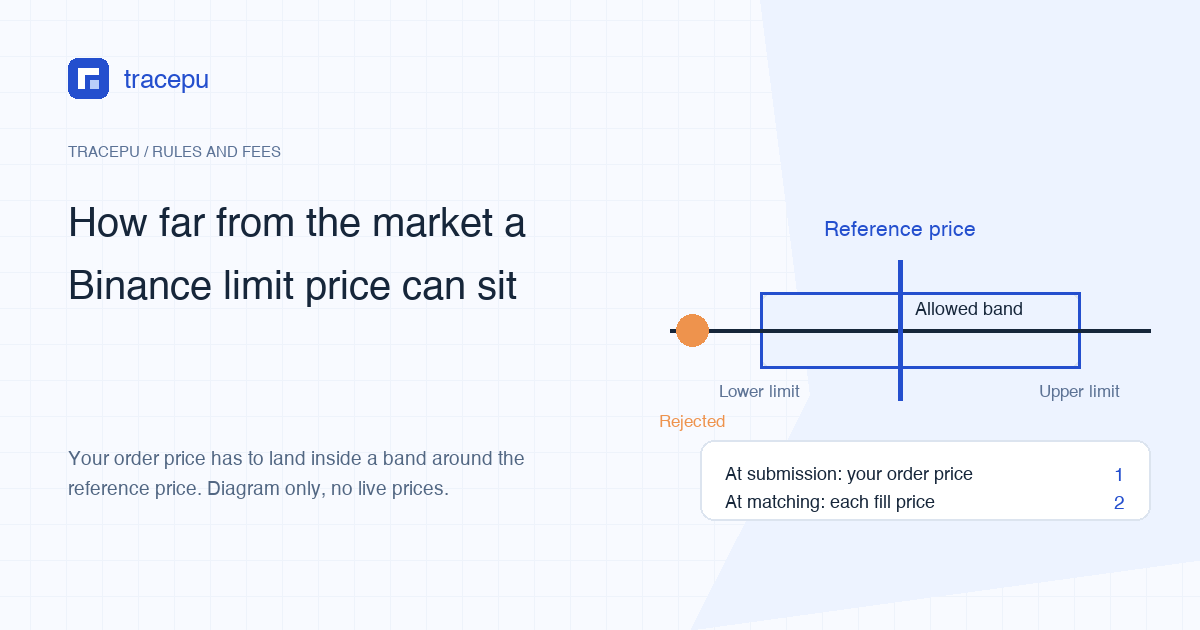
You want to park a buy order well below the current price and wait. The balance is there, the order clears the minimum size, the price uses the right number of decimals, and Binance still refuses it. What usually blocks it is a rule about price alone: your order price can't sit too far from a benchmark the system calculates, and buys and sells each get their own upper and lower multiplier. An order outside that band never reaches the order book, so nothing fills.
There's a second situation that looks similar and isn't. The order is accepted, part of it fills, and the rest ends up as expired. That one usually traces back to the Spot Price Range Execution Rule, which Binance began rolling out gradually from April 14, 2026. It watches each fill price, not the price you typed. The two checks run at different moments, against different prices, with different results, so this guide takes them one at a time.
"Too far from the market" is measured against which price?
In Binance's Spot API filter documentation, the rule is called PERCENT_PRICE_BY_SIDE. You don't need to remember the name. It takes a benchmark price, multiplies it by one pair of multipliers for buys and another for sells, and that gives you two windows of prices you're allowed to enter.
Benchmark price: if the pair has a non-empty reference price, that's what's used. If not, it's the volume-weighted average price over the last avgPriceMins minutes. If avgPriceMins is set to 0, it's simply the last traded price.
So the last price flashing on your screen and the number the system compares against aren't necessarily the same. A reference price is an average over a stretch of time and moves more slowly than the last trade. If your price sits right on the edge, it can be refused now and accepted a few minutes later, or the other way round.
The pass conditions depend on the side:
- Buy orders: the price can't be lower than benchmark × bidMultiplierDown or higher than benchmark × bidMultiplierUp.
- Sell orders: the price can't be lower than benchmark × askMultiplierDown or higher than benchmark × askMultiplierUp.
The same page also lists PRICE_FILTER, which sets an absolute minimum price, maximum price and tick size for the pair. That's a separate check with nothing to do with distance from the market, so it's left out here.
If you place orders through the API, a price that breaks this rule comes back as Filter failure: PERCENT_PRICE_BY_SIDE. In the app or on the website, go by the text on your own screen. The quick way to tell rules apart is to read what the message complains about. If it's the order value that's too small, that's a different rule, covered in what to check when your order is below the minimum.
Working it out with the BTC/USDT multipliers
The multipliers below are the BTC/USDT values from Binance's public API in September 2026, and Binance can change them. The reference price refreshes every few seconds, so this example doesn't use a live reading. It takes a round 84,000 USDT as the input, which makes the sums easy to check yourself. Use it to learn the arithmetic, not as fixed limits.
| Field | Value used here | What it controls |
|---|---|---|
| bidMultiplierUp | 1.2 | Highest buy price, as a multiple of the benchmark |
| bidMultiplierDown | 0.5 | Lowest buy price, as a multiple of the benchmark |
| askMultiplierUp | 2 | Highest sell price, as a multiple of the benchmark |
| askMultiplierDown | 0.8 | Lowest sell price, as a multiple of the benchmark |
| avgPriceMins | 5 | Minutes of volume-weighted average used when there's no reference price |
| Reference price | 84,000 USDT (example input) | The live value is at /api/v3/referencePrice and changes every few seconds |
The API labels the BTC/USDT reference price as an arithmetic mean (ARITHMETIC_MEAN) over 80 buckets of 3.75 seconds each, which adds up to the last five minutes of trade prices. Because BTC/USDT has a reference price, that's the benchmark, not the volume-weighted average.
| Side | Lowest price accepted | Highest price accepted |
|---|---|---|
| Buy | 84,000 × 0.5 = 42,000 | 84,000 × 1.2 = 100,800 |
| Sell | 84,000 × 0.8 = 67,200 | 84,000 × 2 = 168,000 |
The limits in the table are just the reference price times each multiplier, not rounded to the tick size. For a real order, look up the reference price at that moment and run the sums again; the price still has to match the tick size as well.
Try a few prices against these example numbers. A buy at 40,000, hoping for a dip: below 42,000, refused. Move it to 42,500: inside the band, accepted. A sell where one digit went missing, 8,300 instead of 83,000: far below 67,200, refused. A buy with an extra digit, 838,000: above 100,800, also refused.
Look at how lopsided the multipliers are. Buys can go down to 0.5× but only up to 1.2×. Sells can go up to 2× but only down to 0.8×. The tight side is the one that hurts the person placing the order: buying far above the market or selling far below it. Orders like that tend to match against the book the instant they're submitted, so the loss is locked in straight away. The loose side is where you'd sit and wait. Binance's documentation doesn't say why it's set up this way, but going by the numbers, most fat-finger orders get stopped at the door.
Back to the order from the top of this page. A buy at less than half the reference price falls under the 0.5× floor with these multipliers, so it's refused on submission. That floor follows the reference price: if BTC drops, the lowest buy price you can enter drops with it.
One thing to know if you want to look the multipliers up yourself: Tracepu's Spot order rules lookup currently shows the minimum order value, minimum quantity, quantity step and price tick. It doesn't show these price multipliers. They're in the pair's filter list returned by Binance's public API. If you'd rather not query the API, follow the order screen's prompt and move your price back toward the market.
Part filled, the rest expired: the check at execution
On April 7, 2026, Binance announced the Spot Price Range Execution Rule, PRER for short, to be introduced gradually from April 14. It doesn't act at the same moment as the rule above. That one checks the price you entered when you submit. This one looks at actual fill prices during matching and only lets trades happen inside a dynamic range.
The announcement makes three main points: orders can only execute within a dynamic price range; orders of any type that act as takers and would execute outside that range expire; and under normal market prices the rule doesn't affect everyday trading.
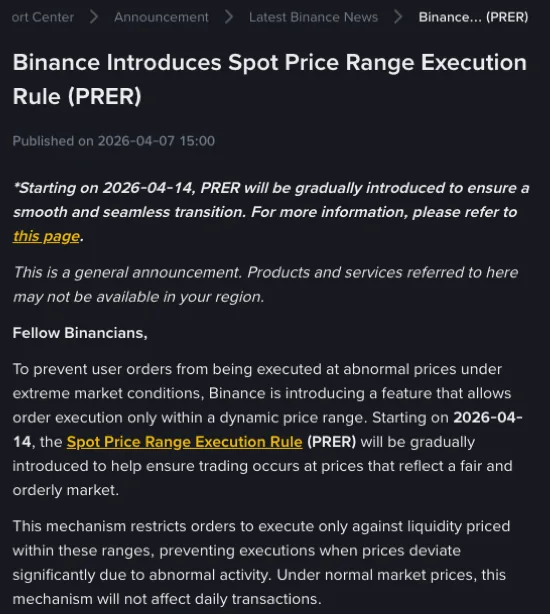
The taker is the side whose order trades immediately against orders already resting on the book. Binance's English FAQ on the rule goes into more detail:
- if a taker order could only keep filling by hitting orders outside the range, the unfilled remainder expires rather than resting on the book;
- if part of the order fills inside the range and the rest would need to cross the boundary, that rest expires;
- it applies to all order types;
- newly listed pairs only get it once they have enough trading history for a dependable reference price.
The range is built much like the one above, reference price times multipliers, but with different fields: bidLimitMultUp / bidLimitMultDown on the buy side and askLimitMultUp / askLimitMultDown on the sell side. When we checked /api/v3/executionRules in September 2026, BTC/USDT had 0.85 to 1.15 on both sides. With the same 84,000 USDT example reference price, taker fills could only happen between 84,000 × 0.85 = 71,400 and 84,000 × 1.15 = 96,600 USDT.
An illustration, not a real order: on a thinly traded pair, a large market buy works its way up through the sell orders. The levels below the top of the range fill as usual. The sell orders above that are outside the range, so the remaining quantity doesn't fill and the order ends as expired. The part that already filled has settled and isn't reversed because the rest expired.
According to the announcement, normal market conditions aren't affected. The rule is aimed at moments when prices jump sharply away from fair value: a few minutes of violent swings, or a pair with so little depth that one order can drag the price a long way.
Through the API, these orders show the status EXPIRED with the expiry reason EXECUTION_RULE_PRICE_RANGE_EXCEEDED. We haven't confirmed the exact wording the app shows for it, so go by the status text on your own screen. To reconcile the part that filled and see what happened to the rest, what a partially filled order leaves behind walks through the checks.
Sources: Binance announcement Binance Introduces Spot Price Range Execution Rule (PRER); Binance FAQ on PRER; order status and expiry-reason field names from the "Price Range Execution Rules" section of the Binance Spot API documentation.
Refused or expired? Telling the two apart
Your order history is the fastest clue. A refused order never made it onto the book: no fills, and you won't find it under open orders. An expired order leaves a line in your history, the filled part settles as normal, and your balances move by whatever actually traded.
| At submission: order price band | At matching: price range execution rule | |
|---|---|---|
| When it's checked | The moment you submit | During matching, before each fill |
| Which price | The price you entered | The actual fill price |
| Benchmark | Reference price; if none, a volume-weighted average over a few minutes; if that's set to 0, the last trade | Reference price |
| BTC/USDT multipliers at the time | Buy 0.5 to 1.2, sell 0.8 to 2 | 0.85 to 1.15 on both sides |
| What happens if it fails | The whole order is refused | The out-of-range part expires; filled quantity settles |
| What you see in records | Nothing on the book; not in open orders | An expired order in history, possibly with some quantity filled |
The low buy order that gets bounced, the one this page opened with, only involves the first check. The second one usually catches taker orders: market orders, or limit orders priced past the other side of the book so they fill as soon as they're sent.
Two cases Binance hasn't spelled out
For conditional orders such as stop-limit, the documentation doesn't say whether the price range is checked when you place the order or only once it triggers and goes to matching. We're not drawing a conclusion on that.
Nor did we find an official answer on what happens to an order already resting on the book if the market later moves away and its price ends up outside the range. The published explanation is about takers, so don't assume the same for resting orders. If you run into a status you can't make sense of, note the order ID, the time and the exact message, and ask through the official support channel inside your account. Before sending screenshots anywhere, see what to save and hide in an order screenshot.
After a refusal, the price is the only thing to change
If the order was refused because its price fell outside the allowed band, compare it with both limits. Raise a price below the lower limit or lower one above the upper limit; this applies to both buys and sells. With the multipliers above, a buy must stay between 0.5 and 1.2 times the reference price. Both limits move as the reference price changes.
If the price you have in mind simply won't fit, say you're set on buying at 40% of the reference price, then it can't be placed right now. That's a rule on the trading pair. Your account isn't flagged and your balance isn't short. You can wait for the market to come closer, or place the order at the lowest price inside the band that you're still happy with.
A few workarounds people try don't help:
Splitting it into smaller orders
The rule looks at price, not size. Each small order is just as far from the market and gets refused just the same. Split too finely and you can run into the minimum order value as well.
Refreshing and resubmitting
The benchmark is an average over several minutes. Until the price has actually moved, resubmitting gives the same answer, and the rule doesn't loosen because you tried more times.
Switching to a market order
A market order fills at whatever the book offers, which throws away the low price you were waiting for. That's the opposite of what a resting buy is for. And since the price range execution rule covers every order type, a market order that runs past the range still has its out-of-range part expire.
Using a conditional order to get around it
As noted above, Binance hasn't said when conditional orders are checked against the price range. Relying on one as a workaround means betting on a step nobody has explained, and it could still be refused the moment it triggers.
Once the price is back inside the band and the order is on the book, it may still sit there for a long time. That's about the gap between your price and the market, and why a limit order isn't filling covers it; neither of the checks here is involved anymore.